Product Description
Overview of Microsoft® Agent Technology
One way to show a more effective and exciting demonstration of the capabilities of your software or website would be to have it interact with the people observing it, and one of the most effective ways to make a product interactive would be to give it a conversational user-interface. A conversational user-interface uses a human-like animated “character” as the control medium for the computer. The user can speak commands and queries to the interface character and the interface character will understand the speech through speech recognition technology. If the character hears the appropriate commands it will then perform the required actions. Furthermore, the character can speak back to the user using a digital text-to-speech engine, allowing the character to provide feedback to the user. In the end, the user’s experience with the software is more like holding a conversation with a friend than using a computer, which leads to a unique experience!
The software developers at Microsoft Corporation have realized the advantages of the conversational user-interface, and have developed a conversational user-interface system called Microsoft Agent. Microsoft Agent software features a life-like animated character that can both understand and speak human speech in over 28 different languages. Along with accepting speech input, Microsoft Agent characters can also respond to computer mouses, keyboards, and touch-screen technology. Microsoft Agent characters can express ideas back to the user through spoken speech, character animations, and text displayed in word bubbles.
Since the language used by the Agent character will be familiar everyday speech, and because the Agent character has the appearance of a friendly looking cartoon character, they will create a very warm and friendly feeling for the person using the computer. Also, since everyone using computers today grew up watching cartoons on television and in movie theaters, the idea of relating to a cartoon is very familiar and easy to adjust to. In fact, the experience may seem so natural to the user that they may forget that they are talking to a computer entirely, and feel instead that they are interacting with a new cartoon friend.
The advantages of such a user interface are clear: it allows a user to do as little as ask a question verbally into a microphone, and automatically the agent character will say the answer back to the user through the computer’s speakers! It makes using a computer or a display device as simple as asking a good friend to do a favor for them. The Microsoft Corporation itself found Agent technology to be so promising that they incorporated it into their most important and widely distributed products, such as the Microsoft Office Suite, Microsoft Internet Explorer, and even every copy of Microsoft Windows 2000 and XP!
Agent Character Appearance
Project Destiny Studios specializes in creating fully interactive hand-animated Microsoft Agent characters. We are officially licensed by Microsoft Corporation to develop and distribute characters built with Microsoft Agent 2.0 technology, and use the latest version of the software released by Microsoft for development.
Although there are other Microsoft Agent development companies in existence, Project Destiny Studios is unique because it is the only one that creates characters using Disney-style hand-drawn animation instead of animating photographs or computer rendered models. The advantages of hand-drawn animation are that it makes the characters look and move just like the animated cartoon characters featured in Disney and Warner Brothers cartoons. Hand-drawn characters have a universal appeal because everyone in today’s generation grew up with watching animated feature films in the theaters when they were children. In addition, hand-drawn animation is still extremely popular to this day, a fact that was illustrated extremely well by the Disney film “The Lion King,” which grossed over US$771 million worldwide during its initial release! The photographic and computer generated animation used by other Microsoft Agent developers lack the appeal and built-in fan base of traditional animation, and because of that they are not nearly as effective at interacting with the customers using them.
Project Destiny Studios has several years experience with creating hand-drawn cartoon characters. We have created them for comic strips, comic books, advertisements, and even music album covers. A Project Destiny Studios character was even published internationally in the Antarctic Press comic book “Gold Digger,” and our comic strips have been published in 3 US newspapers. We have successfully implemented Foxee™, our prototype Microsoft Agent, on her demonstration website at www.foxee.net. Foxee™, a cartoon female arctic blue fox, is a fully functional Agent character and demonstrates the potential of Microsoft Agent technology when used with web applications.
There are several possibilities for the design of your Microsoft Agent character. We can create a custom designed cartoon character from scratch especially for your company. A custom Agent character can uniquely represent your company’s image and present memorable demonstrations of your software or website. Also, if you don’t have any character designs in mind, you can use one of our already existing designs. Below are some examples of a few of the character designs available for licensing:


Foxee™, the arctic blue fox Velvet™, the red fox


Sedona™, the gold fox Tootsie™ the mountain lion

Sahara™, the Cheetah
Character Animation Abilities
Once the design for the Agent character has been decided upon, the next step is to determine the number and kind of animated actions that the character will perform. The standard Microsoft Agent animation set contains 59 animations, which include animations to perform the following functions:
- Showing and leaving the screen
- Gesturing at objects
- Getting the user’s attention
- Explaining things
- Looking pleased or disappointed with the user’s choice
- Looking confused when the character doesn’t recognize the input
- Idling when the character has no task to perform
- Actively listening for spoken input
- Moving to a new location on the screen
- Searching for information
- Reading items to the user
- Looking surprised
- Making a suggestion
- Thinking
- Waving goodbye
A Microsoft Agent character can be created supporting as many or as few of the standard animations as you like, and could contain completely custom animations without a single standard animation if you want it to. You can make your character show any emotion or perform any action that you feel will help it connect with your customers. In the end the possibilities of what could be animated for your character are limited only by your own imagination! In addition, Microsoft Agent characters can also support generic speaking animations, which make the character’s mouth move in sync with the words being spoken giving them the illusion of actually speaking without having to custom animate every word that is being said!
International Language Support
Microsoft Agent characters can speak in any of 28 supported languages, which make Microsoft Agent an effective tool for your company’s international product demonstrations. Microsoft Agent supports the following languages:
- Finnish
- British English
- American English
- Arabic
- Basque
- Croatian
- Czech
- Danish
- Dutch
- French
- German
- Greek
- Hebrew
- Hungarian
- Italian
- Japanese
- Korean
- Norwegian
- Polish
- Portuguese
- Romanian
- Russian
- Chinese
- Slovakian
- Slovenian
- Spanish
- Swedish
- Thai
- Turkish
The Components of the Microsoft Agent Software
The core component of Microsoft Agent technology is the Microsoft Agent Server program. The Agent Server is an ActiveX control that is installed as part of the Windows operating system by default. That means that if your customers are using Windows 95 or better with Microsoft Office installed, they most likely will already be running Microsoft Agent Server without even knowing it! If a customer does not already have the Agent Server software on their machine, it can automatically install itself from the Microsoft website when the Agent application is being executed for the first time.
The second component of a Microsoft Agent application is the Agent Character file. This file contains all of the artwork, sounds, and animations used by an Agent character. The character file can be optimized for website use by transferring animations to the user’s Internet Browser one-at-a-time as needed, or it can be optimized for personal computer use by having all of the animations contained in a single file. The third component of a Microsoft® Agent application is the application program itself. The application is what controls the Agent character and its animations, and can be written in C++, Visual Basic, or Visual FoxPro for desktop-based applications, or in VBScript for web browser-based applications.
Web-Based Agent Character Applications
Microsoft Agent has the ability to be run as a web application through a web browser such as Microsoft Internet Explorer. With this ability, you can access the same Agent application software from any point on the globe through the Internet. The Agent components can automatically download and install themselves onto a client’s computer seamlessly, and clients can enjoy your company’s product demonstration from the comfort of their own office at their convenience. The ability to run Microsoft Agent applications off of a webpage on the Internet represents the ultimate in software portability, because no physical media is required for the software to install, and you are assured that all of your clients around the world are using the same version of your Agent software.
Hardware Requirements
One of the greatest aspects of Microsoft Agent applications is that they have low hardware system requirements. Chances are that many of the personal computers contained in your office right now have more than enough power to run a Microsoft Agent software application. Microsoft Agent characters take up so few system resources that any personal computer bought within the last 5 years should be able to comfortably run Agent. The advantage of this is that Microsoft Agent will require little to no new hardware to be purchased by your business for its implementation, which will save your business thousands of dollars of hardware costs over other software solutions.
The minimum hardware requirements for a Microsoft Agent Character supporting speech recognition technology and digital speech output are:
- Intel® Pentium 166 or compatible microprocessor or higher
- 32MB Random Access Memory (RAM) or higher
- VGA or higher resolution video adapter
- Microsoft Windows 95, 98, NT 4.0, 2000, or XP
- Microsoft Internet Explorer 4 or Later (for web applications)
- Windows-compatible sound card
- Headphones or Speakers
- A Microphone
The Production Process
The creation of Microsoft Agent software applications at Project Destiny Studios is separated into two main processes, the production of the Agent character file and the development of the Agent-enabled software application. The animation process used by Project Destiny Studios is very similar to the process used by the large animation studios such as Walt Disney or Warner Brothers with the exception that we do it on a much smaller scale. Creating a traditional animation character is much like creating a fine wine-- the process is very involved and labor intensive, however the results that it provides in the end are second to none, and more than make up for the extra time and effort.
The first step for animating a cartoon character for Microsoft agent is to create a standard model sheet for the Agent character, an example of which is illustrated below:
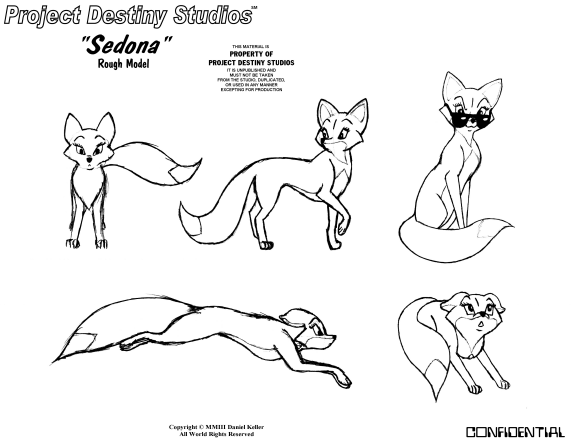
Character model sheets show a character in a variety of poses and allow the standardization of the look and proportions of the character so that it is drawn consistently throughout the animation process.
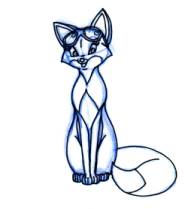
The second stage of the animation process for Agent characters is the creation of rough animation drawings. Rough animation drawings are what are actually drawn by the animator, and the focus of the rough drawing process is to perfect the fluid motion of the character and make it look alive. Because of the intense focus on the perfection of the character’s movement at this stage, there is less emphasis on the neatness or completeness of the drawn character. This is done to save drawing time. At a standard film rate it takes 24 animation drawings to create one second of animation, so there is far too many drawings to create at this stage to worry about how messy the drawings are, as long as they move correctly. Project Destiny Studios uses motion picture industry standard 12-field ACME registered animation paper and professional grade animation pencils to ensure the highest quality animation results. An example of a typical rough animation drawing is shown below:
The next stage in the animation process is called the “Rough Pencil Test.” In a rough pencil test, all of the rough animation drawings are animated to see if the animation looks correct and is consistent. If there are any changes that need to be made, they can be corrected at this stage before the drawings are developed any further in the animation process.
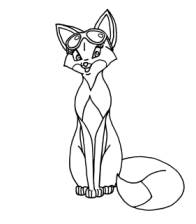
After the animation is determined to be flawless in the pencil test, clean and complete drawings of the character are then created based on the rough animation drawings. These new production drawings are known as “clean-ups,” and you can see an example of a clean-up drawing here:
To ensure that the flow of the animation is still consistent, the clean-up drawings are then pencil tested to see if any of the drawings need to be re-done or altered. An “exposure sheet” is then created, which tells the camera operator what drawings need to photographed in what order for each frame of animation. In the case of Project Destiny Studios, a custom Mustek A3-sized ScanExpress flatbed scanner that has an ACME registration peg-bar and a 35mm animation camera guide mounted on the case is used instead of a traditional animation movie camera, which saves on film supply and development costs.
The final step of the animation process is known as the “Ink and Paint” process. This is where each clean-up drawing is digitally painted and colored in, resulting in the final production image, known as a “cel” image.

Lastly, all of the animation frames are imported into the Microsoft Agent character file, where they are placed in the appropriate order and assigned to an Agent animation event so that they can be called by the Agent application.
For the development of the software application that controls the Microsoft Agent character file, Project Destiny Studios follows the standard Systems Development Life Cycle model of software development. This model organizes the following development processes into 5 phases:
· Planning
o Initial assessment
o Feasibility study
· Analysis
o User requirements
o Existing system evaluation
o Logical system design
· Detailed Systems Design
o Detailed system specification
· Implementation
o Coding, testing and debugging
o Installation, fine tuning
· Maintenance
o Evaluation
o Maintenance
o Enhancement
The Systems Development Life Cycle is a proven iterative approach to building and maintaining systems and has the ability to enrich each phase of development with the information gained from the other phases. It will allow for a better built more cost effective system that can be continuously improved upon if need be. Each phase of development will be performed only after hearing your input on all ideas and suggestions, and regular progress reports will be sent to inform you of the current status of your application throughout its development. The application will be built using the tools best suited for its intended implementation, such as Microsoft Visual C++ for desktop applications, Microsoft Visual FoxPro or Microsoft Access for a Database applications, and a programming syntax-enabled editor for VBScript and web applications.
Communication
Lastly, communication between our companies can be achieved in several ways, including electronic mail, facsimile, voice telephone calls, or by postal mail—which ever way is the most convenient for you and your company.